Oracle Cloud Hermes Agent — Visual Architecture Guide
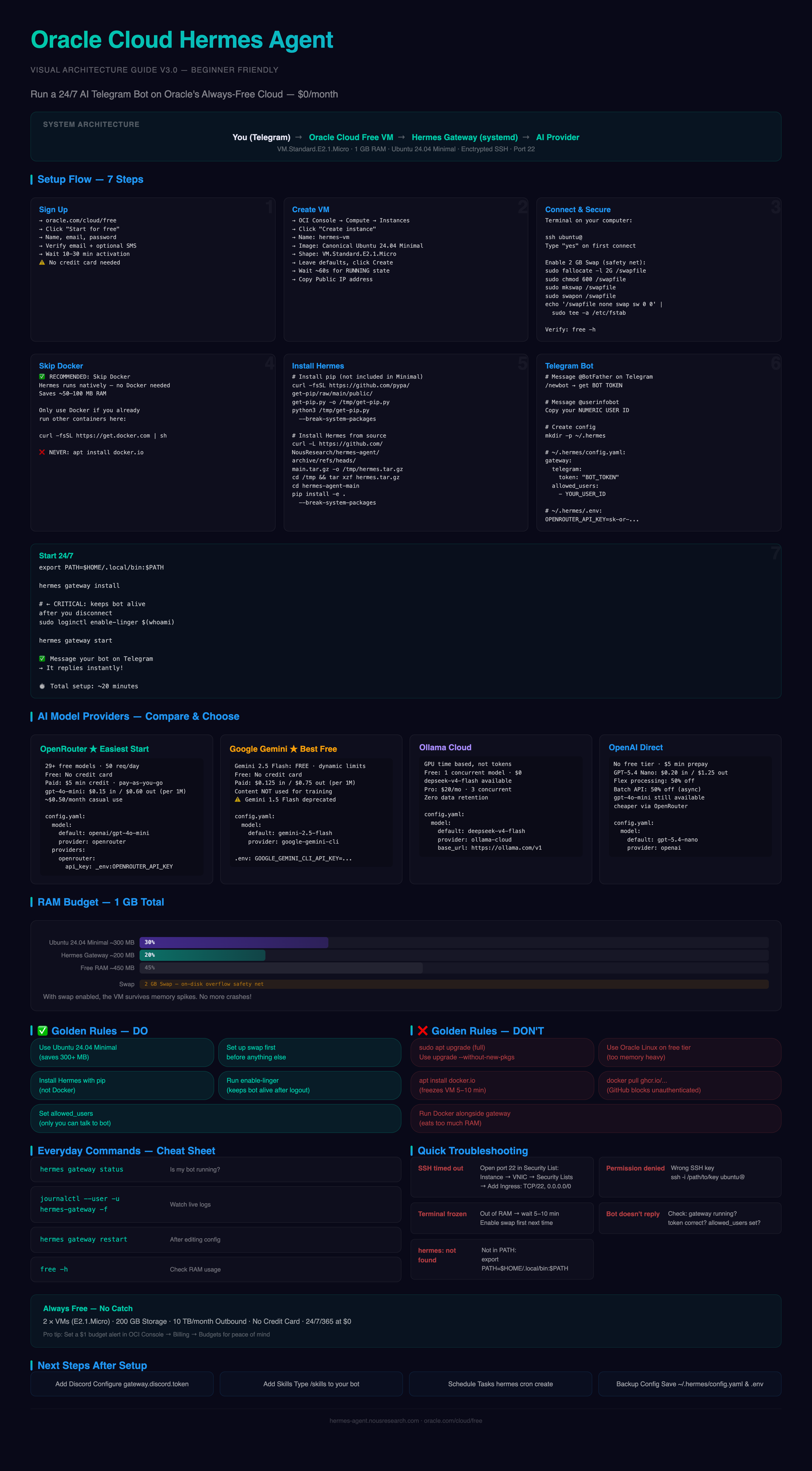
System Architecture
You (Telegram) → Oracle Cloud Free VM (1 GB RAM, x86) → Hermes Gateway (systemd service) → AI Model (OpenRouter / Gemini / Ollama)
🔒 Encrypted · ⏱️ 24/7 Uptime · 💰 $0/mo · 📱 Telegram
Get Your Free Cloud Computer
Start by going to oracle.com/cloud/free and clicking Start for free. Fill in your name, email, and a password. Verify your email, and you’re in — no credit card required. You may get an SMS verification, which is normal. Account activation takes 10–30 minutes.
Once logged into the Oracle Cloud console, click the hamburger menu (☰) in the top-left, then go to Compute → Instances and click the blue Create instance button. Here’s what to choose:
| Field | What to choose | Why |
|---|---|---|
| Name | Anything you like, e.g. hermes-vm | Just a label |
| Image | Canonical Ubuntu 24.04 Minimal | ”Minimal” uses only ~300 MB of memory — critical on the free 1 GB tier |
| Shape | VM.Standard.E2.1.Micro | The free x86 shape that’s almost always available |
Leave everything else at the defaults, scroll down, and click Create. Your VM takes about 60 seconds to boot — when the square turns green and says RUNNING, copy the Public IP address (it looks like 123.45.67.89). If you later can’t connect, see the Troubleshooting section.
Connect to Your VM
SSH is how your computer talks to the cloud VM — like opening a terminal window into a computer sitting in a data centre somewhere. Open a terminal on your computer and run:
ssh ubuntu@<YOUR_VM_IP>On your first connection, type yes when asked if you trust the machine.
Your free VM has only 1 GB of memory. Think of it like a tiny desk — fine for one person, but it fills up fast. Swap gives you extra scratch space on disk that catches the overflow when memory runs out. Without it, programs crash.
sudo fallocate -l 2G /swapfile
sudo chmod 600 /swapfile
sudo mkswap /swapfile
sudo swapon /swapfile
echo '/swapfile none swap sw 0 0' | sudo tee -a /etc/fstab
Run free -h to confirm — you should see Swap: 2.0Gi.
For an extra layer of security, add a basic firewall:
sudo ufw allow OpenSSH
sudo ufw enable
Do You Need Docker? Short Answer: No.
Hermes Agent runs as a regular program — no Docker required. Skipping it saves ~50–100 MB of memory, removes install steps, and eliminates things that can go wrong.
Only use Docker if you’re already running other containers here. In that case, curl -fsSL https://get.docker.com | sh is the safe way. Never use apt install docker.io — it tries to install 50+ packages at once and freezes your 1 GB VM.
Pick Your AI Brain
Hermes Agent doesn’t come with its own AI — you connect it to a model provider. Here are your options, from easiest to most advanced.
OpenRouter — Easiest to Start
A single API with 29+ free models and hundreds of paid models from OpenAI, Anthropic, Google, and others.
| Details | |
|---|---|
| Free tier | 29+ free models, 50 requests/day, 20 requests/min. No credit card. |
| Paid | $5 minimum credit. Pay-as-you-go. Credits last 365 days. |
| Best cheap model | openai/gpt-4o-mini at $0.15 input / $0.60 output (per 1M tokens) |
| Estimated cost | ~$0.50/month for casual Telegram use |
# config.yaml
model:
  default: openai/gpt-4o-mini
  provider: openrouter
providers:
  openrouter:
    api_key: _env:OPENROUTER_API_KEY
    default_model: openai/gpt-4o-mini
    models:
      - openai/gpt-4o-mini
      - google/gemma-4
In your .env file, add OPENROUTER_API_KEY=sk-or-v1-YOUR_KEY.
Google Gemini — Best Free Tier
Google’s own models with generous free access — Gemini 2.5 Flash is free, no credit card needed. Paid tier starts at $0.125 input / $0.75 output per 1M tokens, with content NOT used for training.
Gemini 1.5 Flash is deprecated — use 2.5 Flash instead.
# config.yaml
model:
  default: gemini-2.5-flash
  provider: google-gemini-cli
In .env: GOOGLE_GEMINI_CLI_API_KEY=AIza...
Ollama Cloud — Plan-Based
Pays by GPU time, not tokens. Free tier lets you run one model, with deepseek-v4-flash available. Pro is $20/mo for 3 concurrent models.
# config.yaml
model:
  default: deepseek-v4-flash
  provider: ollama-cloud
  base_url: https://ollama.com/v1
OpenAI — Direct Access
No free tier, $5 minimum prepay. Cheapest is GPT-5.4 Nano at $0.20 input / $1.25 output (50% off with Flex). gpt-4o-mini is still available through OpenRouter at cheaper rates — use OpenRouter unless you need native OpenAI features.
# config.yaml
model:
  default: gpt-5.4-nano
  provider: openai
providers:
  openai:
    api_key: _env:OPENAI_API_KEY
Install Hermes Agent
Ubuntu Minimal doesn’t come with pip (Python’s package installer), so install it first:
curl -fsSL https://github.com/pypa/get-pip/raw/main/public/get-pip.py -o /tmp/get-pip.py
python3 /tmp/get-pip.py --break-system-packages
Then download and install Hermes from the official source:
curl -L https://github.com/NousResearch/hermes-agent/archive/refs/heads/main.tar.gz -o /tmp/hermes.tar.gz
cd /tmp && tar xzf hermes.tar.gz && cd hermes-agent-main
pip install -e . --break-system-packages
Now create your Telegram bot. Message @BotFather → /newbot → copy the bot token. Message @userinfobot → copy your numeric user ID. The allowed_users setting means only you can talk to your bot — no random people.
Create the config folder and files:
mkdir -p ~/.hermes# ~/.hermes/config.yaml
gateway:
telegram:
token: "YOUR_BOT_TOKEN"
allowed_users:
- YOUR_NUMERIC_ID
model:
default: openai/gpt-4o-mini
provider: openrouter
providers:
openrouter:
api_key: _env:OPENROUTER_API_KEY
default_model: openai/gpt-4o-mini# ~/.hermes/.env
OPENROUTER_API_KEY=sk-or-v1-YOUR_KEYFinally, start the gateway and keep it running 24/7:
export PATH=$HOME/.local/bin:$PATH
hermes gateway install
sudo loginctl enable-linger $(whoami)
hermes gateway start
That enable-linger command is important — normally, when you close your SSH connection, everything you started stops. This tells the VM: “keep my programs running even when I’m not logged in.” Without it, your bot dies the moment you close your terminal.
Open Telegram, message your bot, and it should reply instantly. Total time from sign-up to a working bot: ~20 minutes — most of that is waiting for Oracle to activate your account.
What’s Happening Inside Your VM
Your free VM has 1 GB of memory. Here’s how it gets used:
██████████████████████████ Ubuntu OS         ~300 MB
████████████ Hermes Agent                    ~200 MB
████████████████████████████████ Free RAM    ~450 MB
2 GB Swap — safety net on disk| Component | Memory |
|---|---|
| Ubuntu 24.04 Minimal | ~300 MB |
| Hermes Gateway | ~200 MB |
| Free RAM | ~450 MB |
| Swap (disk overflow) | 2 GB |
With swap enabled, the VM won’t crash even if memory briefly spikes — you’ve got plenty of headroom.
Golden Rules
Do This
- Use Ubuntu 24.04 Minimal — saves 300+ MB vs other images
- Set up swap before installing anything
- Install Hermes with pip, not Docker
- Run
enable-lingerso your bot survives after you disconnect - Set
allowed_usersso only you can talk to your bot
Avoid This
sudo apt upgrade(full) — usesudo apt upgrade --without-new-pkgs -yinstead- Oracle Linux on the free tier — uses too much memory
apt install docker.io— freezes your VM for 5–10 minutesdocker pull ghcr.io/nousresearch/hermes-agent— GitHub blocks unauthenticated pulls
Everyday Commands
hermes gateway status                     # Is my bot running?
journalctl --user -u hermes-gateway -f    # Watch live logs
hermes gateway restart                    # Restart after editing config
free -h                                   # Check memory
Troubleshooting
Signup & VM Creation
| Problem | Fix |
|---|---|
| ”Transaction declined” during signup | Try a different browser or retry after 24 hours |
| Didn’t get verification email | Check spam; retry with a different email |
Can’t Connect to the VM
| Problem | Fix |
|---|---|
Connection timed out | Security list isn’t letting SSH through. Fix: OCI Console → your instance → Attached VNICs → click the VNIC → Security Lists → Add Ingress Rules: Source 0.0.0.0/0, Protocol TCP, Port 22. Wait 30 sec, try again. |
Permission denied (publickey) | Wrong SSH key. Use ssh -i /path/to/your/key ubuntu@<IP>. |
| Still can’t connect | Give it another 30–60 seconds — the VM may still be booting. |
VM Is Slow or Frozen
| Problem | Fix |
|---|---|
| Terminal freezes mid-command | Ran out of memory. Wait 5–10 min for recovery. Enable swap first next time. |
| Commands take forever | Install htop, check if memory is full, stop extra programs. |
Hermes Agent
| Problem | Fix |
|---|---|
hermes: command not found | Not in your PATH. Run export PATH=$HOME/.local/bin:$PATH. |
pip: command not found | Ubuntu Minimal has no pip. Run the get-pip.py bootstrap above. |
| Bot doesn’t reply on Telegram | Check: (1) hermes gateway status — running? (2) Bot token correct? (3) allowed_users set to your numeric ID? |
| Config says “No messaging platforms” | gateway.telegram.token is missing from ~/.hermes/config.yaml. |
| Agent crashes randomly | Check swap is active with free -h. Close extra programs. |
It Really Is Free — Here’s Proof
Oracle Cloud’s Always Free tier gives you two of the VMs we used, 200 GB of storage, and 10 TB of monthly internet traffic — all at zero cost with no credit card.
For peace of mind, set up a budget alert: OCI Console → Billing & Cost Management → Budgets → create a budget with a $1 threshold and email alert. You’ll know instantly if anything crosses into paid territory. Everything in this guide stays within free limits.
Next Steps
Once your bot is running, here’s what to explore:
- Add Discord — configure
gateway.discord.tokento use your bot on Discord too - Add skills — type
/skillsto your bot on Telegram to see what it can do - Schedule tasks — use
hermes cron createfor recurring jobs - Back up your config — save
~/.hermes/config.yamland~/.hermes/.envsomewhere safe